Place here your comments about anything related with platform settings.
platform_comments: Platform comments
Build Time & Cost estimations
Enable Estimations
If enabled, automatically calculates BTE & cost. Following parameters are only used with this purpose. Take into account that BTE might fail if any speed is below 10.0 mm/s.
estimations_enable: Enable Estimations
Jump Speed
Speed of jumping between vectors with the laser turned off.
jump_speed [mm/s]: Jump Speed
Mark delay per vector
The extra delay added to the last mark in a sequence of concatenated marks.
mark_delay_per_vector [µs]: Mark delay per vector
Polygon delay per vector
Slowdown factor for sharp angles between scanning vectors. When two adjacent vectors are at any other angle than 180 degrees, there is a slowdown of the laser. The delay is larger for sharp angles, for very blunt angles the delay is almost zero.
polygon_delay_per_vector [µs]: Polygon delay per vector
Jump delay per vector
Extra delay added when lasers needs to jump.
jump_delay_per_vector [µs]: Jump delay per vector
Recoating time per layer
Time for powder recoating when laser is turned off.
recoating_time_per_layer [s]: Recoating time per layer
Non-solid support thickness
non_solid_support_thickness [mm]: Non-solid support thickness
Waste Factor
waste_factor [%]: Waste Factor
Material_density
material_density [g/ccm]: Material_density
Currency
currency: Currency
Material price
material_price [Currency/kg]: Material price
Machine costs
machine_costs [Currency per hour]: Machine costs
Process preparation costs
process_preparation_costs [Currency]: Process preparation costs
Post processing costs
post_processing_costs [Currency]: Post processing costs
Sorting
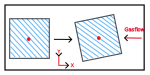
Sorting against gas flow
gasFlow_enable: Sorting against gas flow
Merge blocks if possible
If enabled, the algorithm will try to merge blocks of vectors that have the same type. This can be not efficient for the laser allocation of some machines.
merge_blocks_if_possible: Merge blocks if possible
Build Order
Build order mode
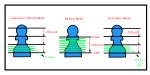
There are three different options for the “Build Order Mode”:
“Platform”: One specific vector type is scanned for all parts on the platform, after that passing on to the next vector type. Support data is considered in the explicit output order defined in the list below.
“Model”: All vector types for each part are scanned after one another rather than platform-wide. All vector types of a part are scanned in exactly the order, which was defined in the list below. After that the scanning passes on against the defined gas flow direction to the next part. Supports are treated like parts.
“Region”: All vector types for each region are scanned after one another rather than platform-wide. All vector types of a region are scanned in the order which was defined in the vector type list. After that, the scanning passes on to the next region. Regions of supports are treated like regions of parts.
sort_buildOrderMode: Build order mode
Options:
Model (Model)
Platform (Platform)
Region (Region)
Vector type order
sort_vectorTypeOrder: Vector type order
Columns:
Vector type
vector_type: Vector type
Options:
Upskin Remelting | Border (UpskinRemeltingBorder)
Upskin Remelting | Following border (UpskinRemeltingFollowingBorder)
Defines the point used for sorting the regions or the parts against the gas flow direction. The sorting point is used to determine the order of the parts or regions in the build order.
sort_point: Sorting point
Options:
Bottom Left (BottomLeft)
Top Right (TopRight)
Center (Center)
Split mesh support if non-manifold
When enabled, uses the split by shells operation to separate solid and non-solid support meshes instead of relying on the solid flag from Magics. This is more reliable for detecting non-manifold support structures mainly if you use the assign selected as support feature.
split_mesh_support_if_non_manifold: Split mesh support if non-manifold
Part placement check
Platform analysis
Checks if any part is placed outside the platform bounds after the scaling factors are applied. If this happens, even partially, the processing is aborted. Collision detection is applied only for parts and not for supports. If the checkbox is OFF, check will not be carried out considerably decreasing the preprocessing time.
Defines the minimum severity written to the log output. Debug shows all messages (most verbose), Info shows normal processing information, Warning shows only potential issues, and Error shows only failures. Higher severity levels reduce log detail.
log_level: Log level
Options:
Info (Info)
Debug (Debug)
Warning (Warn)
Error (Error)
Advanced
Multiprocessing
Enables or disables Python multiprocessing in the build processor. This setting does not affect the C++ algorithm layer multithreading, which is always enabled. Disable this option to reduce application memory usage.
multiprocessing: Multiprocessing
Multiprocessing max workers
Maximum number of Python worker processes that can run in parallel when multiprocessing is enabled. Use 0 (default) to let the build processor use as many processes as possible. Higher values can improve throughput but usually increase memory usage.
multiprocessing_max_workers: Multiprocessing max workers
Multiprocessing max concurrency
Upper limit on concurrent Python multiprocessing tasks. Use lower values to limit peak parallelism and memory pressure.
multiprocessing_max_concurrency: Multiprocessing max concurrency
Compatibility mode
If enabled, the slm file format mechanism to override parameters is disabled. This is useful for older MCS versions.
compatibility_mode: Compatibility mode
Options:
No parameter override (NoParameterOverride)
Disable (Disable)
Surface angle mode
EXACT: The down and upskin angle settings now closely match the geometries overhang angle. APPROXIMATION: Classic BP implementation including volume_fill_offset.
surface_angle_mode: Surface angle mode
Options:
Exact (Exact)
Approximation (Approximation)
Allow virtual copies on the rotated parts
If enabled, the hatching pattern is copied to the virtual copies that are rotated around the Z axis.
allow_vcopy_on_rotated_parts: Allow virtual copies on the rotated parts
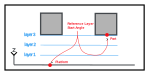
Start angle reference
Defines if the filling start angle is on calculated per part of based on the platform layer index.
start_angle_reference: Start angle reference
Options:
Part (Part)
Platform (Platform)
Uniform angle calculation
When enabled, all fill patterns on the same layer use the same angle calculation method regardless of their individual sorting setting. Normally, unidirectional (ZigZig) and bidirectional (ZigZag) sorting modes produce different angle sequences across layers. This can cause vector types with different sorting settings to have misaligned hatch angles on the same layer. Enabling this setting forces all angle calculations to use the bidirectional (ZigZag) method, ensuring all vector types share a consistent angle per layer. This improves toolpath alignment and reduces artifacts at region boundaries. Note: this only affects angle calculation; the actual scan direction (unidirectional or bidirectional) of each vector type remains unchanged.
If enabled, embeds each part’s build strategy (generating parameters) into the exported Slm file for traceability, scoped per build style. Disabled by default because it significantly increases the Slm file size.
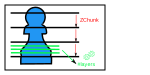
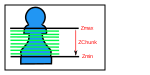
‘Automatic z-range’ option allows to make the configuration of the zchunks less dependent on the machine it is running on, by normalizing the zchunking ‘per gigabyte of available RAM ‘.
zchunk_strategy: Z-chunk strategy
Options:
Disable (Disable)
Layers per z-chunk (LayersPerZChunk)
Automatic z-ranges (AutoZRanges)
Debug slices (DebugSlices)
Layers per Z-chunk
Reduces memory pressure from small slice thickness by splitting the work in batches of z-chunks.
layers_per_zchunk: Layers per Z-chunk
Million points per GB
Reduces memory pressure from small slice thickness by splitting the work in batches of z-chunks. This parameter allows to relate the complexity of the 3D mesh to its memory consumption after slicing. It indicates the number of vertices in a zchunk (per GB).